
How do I delete my account?
Before you go, email us at help@zocomputer.com. Whatever's wrong, a surprise charge, credits running low, something not working, we can usually fix it quickly and make things right for ya. If you do want to proceed with deleting your account, follow these steps below:
Log in at zo.computer.
Open Settings, then Advanced.
Click Delete Account and confirm.
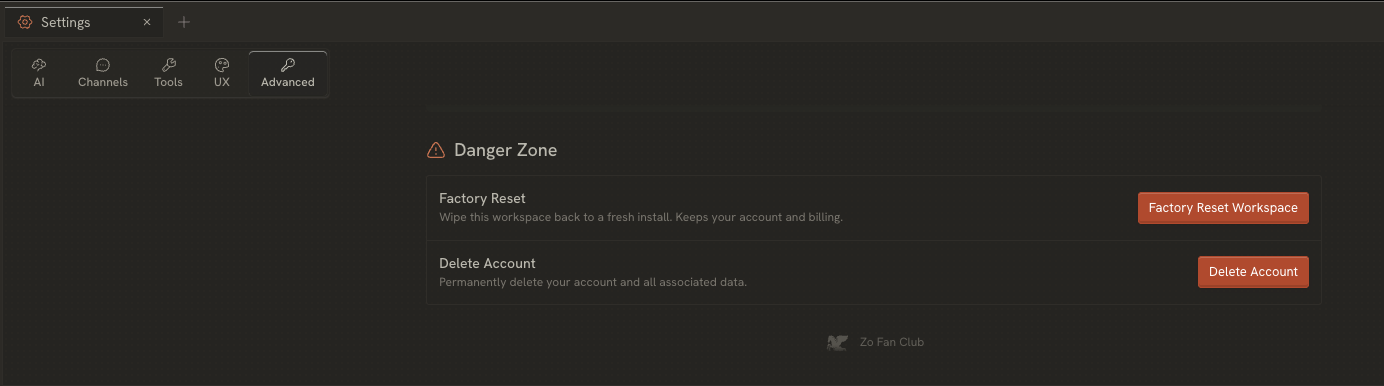
This erases your account, your computer, and everything on it. Be sure to download everything you want to keep first.
Just want a fresh start instead? Factory reset, on that same Advanced screen, clears your workspace but keeps your account and billing live.
Leaving over cost? Switch to your own AI key and pay your provider directly, instead of spending credits on Zo.
And if you have any feedback for us, we're a small team trying to build something you'll love, and always open to hearing from you. Thanks for giving Zo a try 🫡
Need a hand with anything else? Email us anytime at help@zocomputer.com, or hop into our Discord for real-time help from the team and the wider Zo community.